
Create Campaign Member
Create Campaign Member from Business Card in Salesforce
You meet valuable prospects at exhibitions, conferences, networking events and sales meetings, but your event data only becomes useful when you connect each prospect to the right Salesforce Campaign.
You can use Business Card Scan App to scan your prospect, find the appropriate Salesforce record and add your prospect to your selected Campaign as part of the same sales workflow.
You can therefore move from a physical business card to a Salesforce Campaign Member without asking your sales representative to enter the information manually after your event.
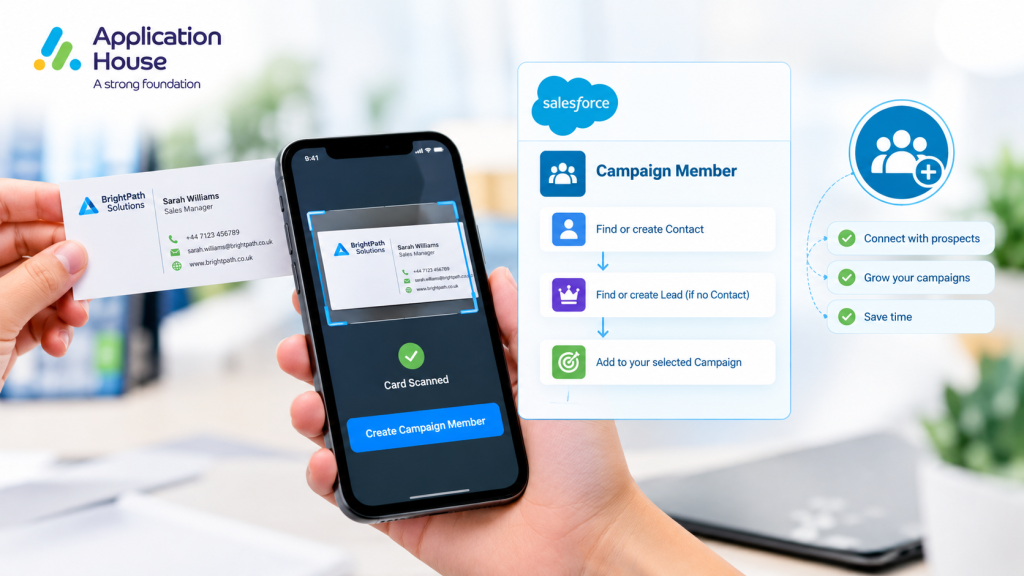
How to Create Campaign Member from Business Card
You can use the ready made Create Campaign Member scan when your sales team needs to capture people against a Salesforce Campaign.
You can scan your prospect’s business card and let your configured scan determine whether your person already exists as a Contact or needs to be handled as a Lead.
You can then add your person to your selected Salesforce Campaign without creating a separate Campaign Member manually.
You can keep your event capture process focused on your sales conversation while your Salesforce records are prepared during the scan.
Find Your Existing Contact First
You may already have your prospect in Salesforce when your sales representative meets that person at an exhibition.
You can use the Create Campaign Member scan to look for your existing Contact before you create another sales record.
You can use the default matching configuration based on First Name + Last Name + Email to help your scan identify the appropriate person.
You can keep your existing Contact history together when your known customer or prospect attends another event.
Create Your Lead When No Contact Is Found
You may meet a completely new prospect whose details do not already exist as a Contact in your Salesforce organisation.
You can configure your scan so your Lead is created when no Contact is found.
You can therefore capture your new prospect without creating both a Contact and a Lead for the same event interaction.
You can keep your sales data easier to understand when your sales team knows which record represents your prospect.
Add Your Prospect to the Right Salesforce Campaign
You can associate your scanned person with the Salesforce Campaign that represents your exhibition, conference, seminar or sales event.
You can let your administrator choose the Campaign in advance when your whole sales team is attending the same event.
You can instead allow your scanning user to select the Campaign when your sales representatives work across different events or campaigns.
You can use the approach that best matches your sales process rather than forcing every event team into the same workflow.
Select Your Campaign Before the Event
You can let your Salesforce administrator select your Campaign before your sales team starts scanning.
You can reduce the choices your representatives need to make when your entire team is capturing prospects for one exhibition.
You can help your sales representatives concentrate on conversations when your Campaign is already selected for them.
Select Your Campaign While Scanning
You can let your sales representative choose your Campaign during scanning when your team needs more flexibility.
You can use this option when your representative attends several events or captures prospects for different sales campaigns.
You can keep control in your user’s hands when your sales process requires the Campaign to be chosen at the point of capture.
Prevent Duplicate Salesforce Campaign Members
You do not want your same prospect added to your same Campaign repeatedly because your representative scanned the person’s card more than once.
You can use the Create Campaign Member workflow to prevent your same Campaign Member from being added twice.
You can keep your Campaign data cleaner when your sales team rescans an existing prospect during a busy exhibition.
You can also make your Campaign reporting more reliable because your duplicate scans do not artificially increase your Campaign Member numbers.
Use Your Existing Salesforce Contact Instead of Creating Another Record
You may already know your prospect from an earlier sales conversation, account relationship or previous event.
You can identify your existing Contact and associate your person with your new Campaign instead of unnecessarily creating another person record.
You can preserve your customer’s existing Salesforce history while recording your new Campaign engagement.
You can give your sales representative a more complete view of your prospect because your previous activity remains connected to the same Contact.
Capture New Event Leads into Your Salesforce Campaign
You can also use the workflow when your event visitor has never interacted with your business before.
You can capture your visitor’s business card, create your Lead where appropriate and associate your person with your selected Campaign.
You can give your sales team a structured list of event prospects rather than leaving your new business cards disconnected from your Campaign reporting.
You can start your post event sales activity with your prospects already organised around the Campaign that generated them.
Why Campaign Member Creation Matters for Your Sales Team
You gain more than a digital copy of your business card when you connect your scan to your Salesforce Campaign.
You can see which Campaign introduced your prospect to your business.
You can give your sales team context about where your Lead or Contact was captured.
You can organise your event follow up around the Campaign instead of working through piles of business cards.
You can also use your Salesforce Campaign data to understand how your event activity contributes to your sales pipeline.
Create Campaign Member at Trade Shows
You can use your Campaign Member scan when your sales representatives meet dozens of prospects during a trade show.
You can let your representative scan your visitor’s card while your conversation is still fresh.
You can associate your visitor with your trade show Campaign so your sales team can identify where your relationship started.
You can then use your Campaign Member list to organise your sales follow up after your exhibition.
Create Campaign Member at Networking Events
You can use the same process when your team attends networking events where your representatives collect business cards throughout the day.
You can connect each relevant prospect to your networking Campaign while your team still knows the context behind the conversation.
You can reduce the risk that your valuable prospect becomes another unprocessed card on your representative’s desk.
Create Campaign Member for Sales Seminars
You can use your Salesforce Campaign to represent your seminar, product demonstration, customer day or other sales activity.
You can scan your attendee and add your person to your Campaign while your sales interaction is taking place.
You can keep your attendees connected to your sales activity without asking your team to rebuild your attendee list manually after the event.
Create Campaign Member with a Ready Made Scan
You do not need to start your basic Campaign Member scanning process by building your complete Object Mapping from the beginning.
You can switch on your ready made Create Campaign Member scan from your Admin Setup.
You can then make your scan available to your sales users from your Scan to Records page.
You can customise your configuration further when your organisation needs different matching or Campaign selection behaviour.
Keep Your Salesforce Campaign Data Connected to Your Sales Process
You can make your business card scanning more valuable when your scan does more than create a Lead or Contact.
You can connect your prospect to your Salesforce Campaign at the moment your sales team captures the relationship.
You can reduce your manual event administration, protect your Campaign Member data and give your sales team better information for follow up.
You can turn your business card into part of your Salesforce sales process rather than leaving your event data as a separate manual task.
Start Creating Campaign Members from Business Cards
You can use Application House Business Card Scan App to capture your event prospects and connect your people to the right Salesforce Campaign.
You can use the ready made Create Campaign Member scan to find your existing Contact where possible, handle your Lead when required and prevent your same person from being added to your Campaign twice.
You can give your sales team a faster path from your event conversation to your Salesforce Campaign and your next sales action.
Explore Business Card Scan App on Salesforce AppExchange