Create Salesforce Follow Up Task from a Scan
You can connect business card scanning with your next sales action using Application House, helping your team capture new prospects and organise follow up activities within Salesforce.
You can use automatic Salesforce Task creation when you scan a business card, bringing contact capture and follow up planning together in one process. Your sales representatives can spend less time managing separate notes and more time building customer relationships.
How to Create a Salesforce Follow Up Task from a Scan
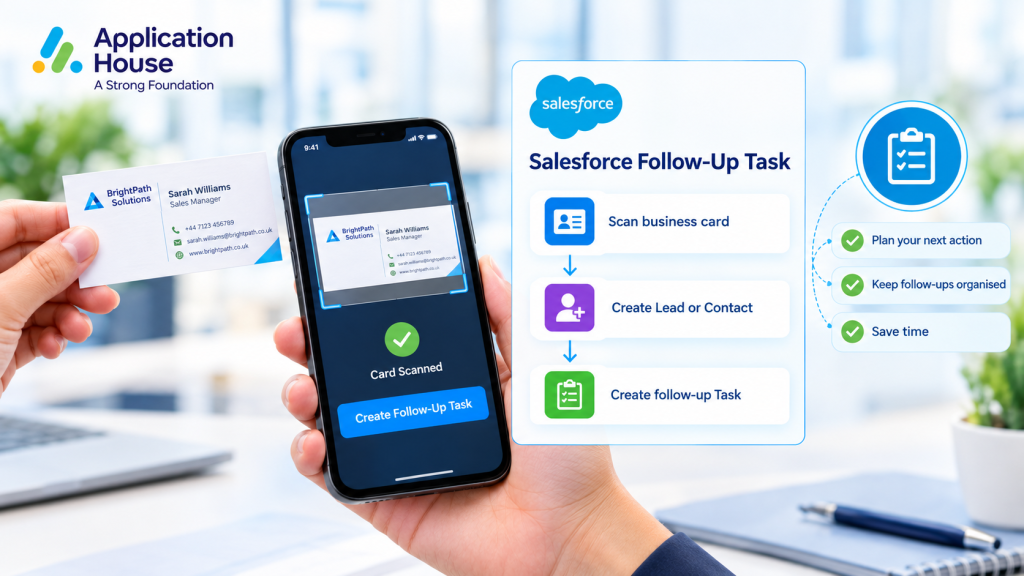
You can use the available scan functionality to capture business card details and create a Salesforce follow up Task. Your team can connect a new prospect with a planned sales action while the conversation is still fresh.
Automatically Create Salesforce Tasks
You can create a Salesforce follow up Task when you scan a business card. Your team can bring prospect capture and task creation together, reducing the need to create each activity separately.
Link Tasks to Salesforce Leads and Contacts
You can connect your follow up Task with the captured Salesforce Lead or Contact, where supported by your configuration. Your sales representatives can keep planned activities associated with the relevant person.
Capture Your Next Sales Action
You can record planned calls, product demonstrations, meetings and pricing follow ups through your Salesforce Task process. Your representatives can use these activities to organise their workload and plan the next conversation.
How Salesforce Follow Up Tasks Improve Your Sales Process
You can make newly captured prospects easier to manage by keeping follow up activities organised within your existing Salesforce workflow.
Manage Trade Show Leads
You can scan business cards during exhibitions, trade shows and networking events and create follow up Tasks for your new prospects. Your sales team can return from an event with clearer next steps for continuing important conversations.
Improve Team Handover
You can help colleagues understand the next action when one representative captures a business card and another manages the follow up. Your Task can provide a record of the planned activity, helping your team coordinate its work.
Support Timely Sales Follow Up
You can help your sales representatives act while conversations are still fresh by recording the next action during prospect capture. Your team can organise follow ups before new contacts become lost among other priorities.
Business Card Scanning and Task Creation: A Practical Use Case
You can use this workflow when a prospect requests a product demonstration at an exhibition. Your representative can scan the business card, capture the contact details and create a follow up Task linked to the relevant Salesforce record.
Your sales team can then use its existing Salesforce activities to manage the planned demonstration and continue the conversation
Streamline Your Salesforce Sales Workflow with Application House
You can combine business card scanning, contact capture and follow up Task creation in one process using Application House. Your team can keep prospect information and planned activities within Salesforce while following its established sales workflow.
You can explore our Create Salesforce Follow Up Task from a Scan feature page for more information, or visit How to Create a Task from Business Card Scan for practical setup guidance.