Use Salesforce Built-in Duplicate Rules
When you scan a business card with Application House Business Card Scan App, you can use your Salesforce Built-in Duplicate Rules as part of the same scanning process.
You can let your app check the business card details against your existing Salesforce data before you decide whether your scanned information belongs to an existing record or a new one.
You can give your sales users a simple scanning experience while your Salesforce duplicate controls continue working behind your business process.
You can therefore capture business cards quickly without asking your users to leave the scan, search Salesforce separately and manually decide whether your prospect already exists.
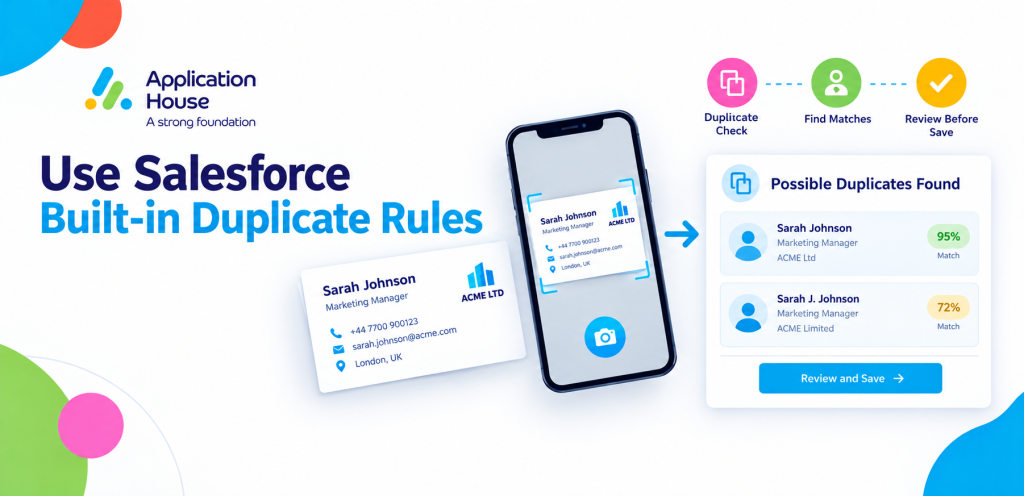
Use Salesforce Built-in Duplicate Rules While You Scan a Business Card
You can scan your business card and let Business Card Scan App use your existing Salesforce Duplicate Rules to identify possible matching records.
You can see the potential matches inside your scanning workflow before you save your business card data.
You can then decide whether your scanned details should update an existing Salesforce record or create a new record where your configuration allows it.
You can keep your Salesforce data controls inside the same process your sales users already follow when they capture a business card.
Let Your Sales User See Existing Salesforce Records During the Scan
When your sales representative scans a business card, you can show your possible existing Salesforce records directly within your Business Card Scan App review process.
You can help your representative recognise an existing customer or prospect without asking your representative to stop scanning and search Salesforce manually.
You can keep your sales conversation moving while your app brings the relevant Salesforce information into your scanning workflow.
You can reduce unnecessary decisions after your event because your representative can deal with your possible duplicate while your business card is being reviewed.
Select the Salesforce Record That Should Receive Your Business Card Data
Your Business Card Scan App can let you choose the existing Salesforce record that should receive your scanned business card information.
You can use this when your prospect already exists in Salesforce but gives your representative an updated business card.
You can direct your newly scanned information towards your existing record instead of automatically creating another Lead or Contact.
You can keep your customer history together while your sales team still captures the latest information from your new business card.
Keep Your Existing Customer History Connected
When your scanned person already exists in Salesforce, you can continue working with your established record rather than starting another disconnected customer history.
You can keep your previous sales activity, conversations and account relationship associated with your existing person where appropriate.
You can give your sales representative more useful business context because your app helps your representative work with your existing Salesforce record during the scan.
You can make your business card capture part of your existing customer relationship rather than treating every new card as a completely new prospect.
Avoid Creating Another Lead for Someone You Already Know
Your sales team can collect business cards from people who already exist in your Salesforce organisation.
You can use Business Card Scan App with your Salesforce Built-in Duplicate Rules to identify those people during your scanning process.
You can help your user avoid creating another Lead when your business already has the relevant person recorded.
You can keep your Lead data focused on genuine new prospects rather than allowing your event activity to create repeated versions of people your team already knows.
Update Your Existing Contact from a New Business Card
Your existing Contact may give your sales representative a new business card after changing a telephone number, job title or company information.
You can scan your new card and use your Salesforce duplicate controls to help identify your existing Contact.
You can select your existing record when it is the correct person and continue your sales process using your established customer history.
You can give your team a more useful Contact record because your new business card information can become part of the record your business already uses.
Use Your Duplicate Rules Across the Records Your Scan Creates
Your Business Card Scan App can work with several Salesforce objects within your scanning process.
You can review possible duplicate decisions for the Salesforce objects included in your scan where your duplicate configuration applies.
You can therefore manage your Account and Contact decisions as part of the same business card workflow rather than treating each record as an unrelated manual task.
You can help your sales users understand where your scanned information will be saved before your records are created or updated.
Prevent the Wrong Account from Being Created
When you scan a business card, your company information can be just as important as your person information.
You can use your scanning review to identify whether your Salesforce data already contains a relevant Account where your configuration supports that match.
You can help your representative avoid unnecessarily creating another Account for a company your organisation already works with.
You can keep your customer relationships easier to understand when your Contacts remain connected with the appropriate existing Account.
Explore our Business Card Scanner App on Salesforce AppExchange to discover its features and capabilities.
Give Your Sales Team Duplicate Protection Without Extra Searching
Your representative should not need to scan a business card, leave your scanning process, search Salesforce, compare records and then return to finish your data entry.
You can use Business Card Scan App to bring your possible duplicate information into your business card review process.
You can reduce the number of separate steps your representative needs to complete when your prospect may already exist.
You can give your sales team a faster route from your physical business card to the right Salesforce record.
Use Your Salesforce Rules Instead of a Separate Duplicate System
Your organisation may already have Salesforce Duplicate Rules configured around your business requirements.
You can use those existing rules through your Business Card Scan App rather than creating a completely separate duplicate process only for business card scanning.
You can keep your Salesforce administrator in control of how your organisation identifies and handles potential duplicate records.
You can also keep your business card capture aligned with the Salesforce data standards your organisation already follows.
Give Your Administrator Control and Your Sales User a Simple Experience
Your administrator can configure your Salesforce duplicate behaviour while your sales user works through a simple business card scanning process.
You can give your sales team the information needed to make the right record decision without asking every representative to understand your complete duplicate management configuration.
You can let your administrator control your business rules while your representative focuses on capturing your prospect and continuing your sales activity.
You can put powerful Salesforce configuration behind a straightforward sales user experience.
Use Business Card Scan App at Exhibitions
When your sales team works at an exhibition, you can meet existing customers, older prospects and completely new people during the same day.
You can scan each business card while your app uses your Salesforce Built-in Duplicate Rules to check your existing CRM data.
You can identify your known prospects during the capture process rather than assuming every card collected at your stand should become a new Lead.
You can leave your exhibition with cleaner Salesforce data because your duplicate decision becomes part of your scanning workflow.
Use Business Card Scan App for Networking Events
When you collect business cards at a networking event, you may not remember whether every person has previously spoken with someone in your organisation.
You can scan your card and let your app check your Salesforce duplicate configuration while your details are being reviewed.
You can use your existing Salesforce information to support your decision instead of relying only on your representative’s memory.
You can keep your networking activity connected with your existing sales relationships where the right record already exists.
Use Business Card Scan App in Field Sales
When your field sales representative receives a business card during a customer visit, you can capture your details immediately.
You can use your Business card scanner app Salesforce Built-in Duplicate Rules through your business card scan app to check whether your person already exists.
You can continue working with your established Salesforce record when your existing match is the correct person.
You can help your field sales team keep your CRM current without creating unnecessary records from every new card your representatives receive.
Protect Your Business Data at the Point of Capture
Your business data quality is affected at the moment your new information enters Salesforce.
You can use Business Card Scan App to apply your existing Salesforce duplicate controls while your business card information is still being reviewed.
You can deal with your potential duplicate before your unnecessary record becomes another item your Salesforce administrator needs to clean up later.
You can make your data quality part of your sales capture process rather than treating your duplicate cleanup as a separate administrative exercise.
Improve Your Sales Reporting from the Start
Your Salesforce reports depend on the records your sales team creates.
You can reduce unnecessary repeated Leads, Contacts and Accounts when your Business Card Scan App works with your Salesforce duplicate controls during capture.
You can give your sales managers more useful information when your same prospect is less likely to appear across unnecessary records.
You can improve the quality of your reporting by improving your business data at the point your sales user scans the card.
Keep Your Sales Pipeline Connected to Real People
Your pipeline becomes harder to interpret when your same person appears several times in your CRM.
You can use your Business Card Scan App duplicate workflow to help your sales user recognise your existing prospect during business card capture.
You can continue your sales activity against your existing relationship where appropriate instead of treating your same person as another new prospect.
You can give your sales team a clearer picture of your real pipeline when your business card scanning process helps control duplicate creation.
Make Native Salesforce Part of Your Business Card Scan
You can keep your business card scanning close to your Salesforce platform by using your existing Salesforce Duplicate Rules inside your capture process.
You can avoid introducing a separate duplicate engine that your sales team needs to understand and your administrator needs to maintain independently.
You can use the Salesforce rules your organisation already trusts while your Application House Business Card Scan App handles your business card capture workflow.
You can give your organisation a scanning process that works with your Salesforce configuration rather than around it.
Turn Your Business Card into the Right Salesforce Record
When your representative receives a business card, you want your information to reach the right place in Salesforce.
You can use Application House Business Card Scan App with your Salesforce Built-in Duplicate Rules to check your existing data during your scan.
You can select your appropriate existing record when your prospect is already known and create your new record when your business process requires one.
You can make your business card scanning faster for your users while keeping your Salesforce data more useful for your sales team.
Use Salesforce Built-in Duplicate Rules with Business Card Scan App
You can use your existing Salesforce Duplicate Rules directly within your Application House Business Card Scan App workflow.
You can let your sales users scan your business cards, identify your possible existing records and decide where your captured information belongs without leaving your scanning process.
You can protect your Lead, Contact and Account data while your representatives continue capturing prospects from exhibitions, meetings, networking events and field sales visits.
You can turn every business card scan into a more controlled Salesforce data decision while keeping your sales user at the centre of your workflow.
Frequently Asked Questions
1. What are Salesforce Built-in Duplicate Rules?
Salesforce Built-in Duplicate Rules help identify potential duplicate records when users create or update information. You can use these rules to check whether a Lead, Contact or Account already exists in your Salesforce organisation and help prevent unnecessary duplicate records.
2. Can you use Salesforce Built-in Duplicate Rules when scanning business cards?
Yes. You can use Application House Business Card Scan App with your existing Salesforce Built-in Duplicate Rules. When you scan a business card, the application can identify potential matching Salesforce records during the review process, allowing you to select the appropriate existing record before saving.
3. How can you prevent duplicate Contacts when scanning business cards into Salesforce?
You can use Salesforce Built-in Duplicate Rules through Business Card Scan App to identify potential matching Contacts. When a matching record is found, you can select the existing Contact instead of creating another one. This helps maintain consistent customer information and existing relationship history.
4. Can you find existing Salesforce Leads before creating a new Lead from a business card?
Yes. You can use your configured Salesforce Duplicate Rules to identify potential matching records during business card scanning. This helps your sales team recognise existing prospects and avoid creating unnecessary Leads when the relevant record already exists.
5. Can you update an existing Salesforce Contact using a newly scanned business card?
Yes. When a person gives you an updated business card, you can scan it and use Salesforce Duplicate Rules to identify the existing Contact. You can select the correct record and direct the newly scanned information to it according to your configured scanning process.
6. Can Salesforce Duplicate Rules help prevent duplicate Accounts?
Yes. Salesforce Duplicate Rules can identify potential matching Accounts based on your configured matching criteria. Through Business Card Scan App, you can review possible existing company records and select the appropriate Account instead of unnecessarily creating another company record.
7. How does Business Card Scan App use native Salesforce Duplicate Rules?
Business Card Scan App works with your existing Salesforce Duplicate Rules to identify potential matching records during the scanning process. It displays possible matches within the review workflow, allowing your sales users to decide whether to use an existing record or create a new one where the configuration allows it.
8. Do you need separate duplicate detection software for business card scanning in Salesforce?
No. You can use your existing Salesforce Duplicate Rules through Application House Business Card Scan App instead of introducing a separate duplicate detection system specifically for business card scanning. Your Salesforce administrator can manage the matching and duplicate behaviour using your existing Salesforce configuration.
9. Can you use Salesforce Duplicate Rules for both Leads and Contacts?
Yes. Salesforce supports duplicate management for Leads and Contacts. You can configure matching rules and duplicate rules for these objects and use the supported duplicate detection within your Business Card Scan App workflow to identify potential existing records.
10. Can Salesforce Duplicate Rules identify companies that already exist in your CRM?
Yes. You can configure Salesforce matching rules to identify potential duplicate Accounts using information such as company name and other relevant fields. During business card scanning, your team can review possible matching company records and select the correct Account.
11. Can you use Salesforce Built-in Duplicate Rules at exhibitions and networking events?
Yes. You can scan business cards collected at exhibitions, conferences and networking events using Business Card Scan App. Your existing Salesforce Duplicate Rules can help identify people who are already in your CRM, allowing your team to distinguish existing customers from genuinely new prospects.
12. How do Salesforce Duplicate Rules improve CRM data quality?
Salesforce Duplicate Rules help reduce unnecessary duplicate records by identifying potential matches during record creation or updates. This supports cleaner Lead, Contact and Account data, improves customer history management and makes Salesforce reporting more reliable.
13. Can Salesforce administrators control how duplicate records are identified?
Yes. Salesforce administrators can configure matching rules and duplicate rules according to their organisation’s data management requirements. They can define which fields are compared and how Salesforce handles potential duplicates, helping maintain consistent data management across the organisation.
14. Does using Salesforce Duplicate Rules mean every duplicate record will be automatically removed?
No. Salesforce Duplicate Rules identify and manage potential duplicate records according to their configuration. They do not automatically guarantee that every duplicate will be detected or removed. Your matching criteria, rule settings and user decisions determine how potential duplicates are handled.