
Enrich Business Cards Data
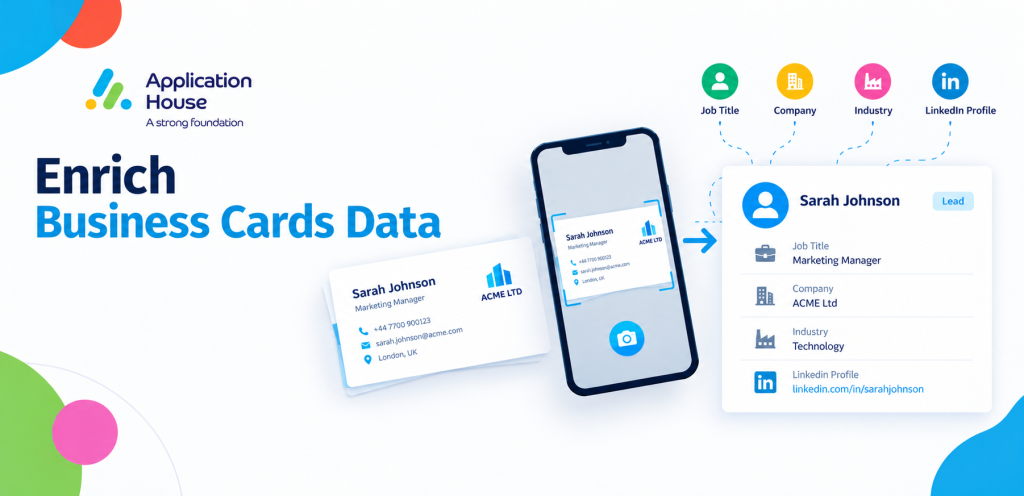
You can turn scanned business cards into more useful Salesforce records with Application House. Your business card scan captures the details your prospect shares, while Find More Details helps you fill blank fields with additional public information.
You can use business card data enrichment to give your sales team more context before its next conversation, without replacing the information you have already scanned.
Why Enrich Business Cards Data in Salesforce?
Your business card may include a prospect’s name, company and email address, but your Salesforce record may still lack useful details. You can use Find More Details to add available public information to blank fields and make your contact data more complete.
Fill Missing Business Card Details
You can use Find More Details when your scanned card leaves useful fields blank. Your Salesforce record can gain additional public information to support your prospect research and prepare your team for its next sales conversation.
Protect Your Scanned Information
You can keep the details captured from your business card protected during enrichment. Your existing scanned values remain unchanged, while your additional information helps complete the record.
Review Enriched Data Before Saving
You can review the additional details before saving your record. Your sales team can check whether the enriched information is relevant and useful for its Salesforce workflow.
Improve Salesforce Record Matching
You can run matching again after enrichment to help identify an existing Salesforce record. Your additional information may help your app recognise a record that was not obvious from the original business card details.
How Business Card Data Enrichment Supports Your Sales Team
You can make your scanned contact information more useful by adding context before your next sales activity.
Prepare for Your First Sales Call
You can enrich an incomplete business card before contacting a new prospect. Your sales representative can review the available information in Salesforce and prepare a more informed conversation.
Keep Your Salesforce Data More Complete
You can use Find More Details to add public information to blank fields instead of relying only on the details printed on a business card. Your team can build more informative records while keeping the original scanned values protected.
Support Better Sales Follow Up
You can give your sales representatives more context when they review newly captured prospects. Your team can use the available information to prepare questions, understand the prospect’s business and plan its next action.
Enrich Business Cards Data: A Practical Example
You can meet a prospect at a trade show and scan a business card containing their name, company and email address. Your Salesforce record may still have other useful fields left blank.
You can use Find More Details to add available public information to those blank fields while protecting your scanned values. Your salesperson can then review the enriched details before saving the record and preparing the next sales conversation.
Explore our Business Card Scanner App on Salesforce AppExchange to discover its features and capabilities.
Enrich Business Cards Data with Application House
You can connect business card scanning with a more informed Salesforce sales process using Application House. Your Find More Details from Business Card Scan capability helps you complete blank fields, protect scanned information and improve record matching after enrichment.
You can visit our Find More Details from Business Card Scan feature page to explore the benefits, or read How to Enrich Business Card Data for practical steps to use the feature.