
Save Scanned Business Card Photo in Salesforce
Save Scanned Business Card Photo in Salesforce
You may convert your business card into structured Salesforce data, but your original card can still contain useful business context that your individual fields do not fully show.
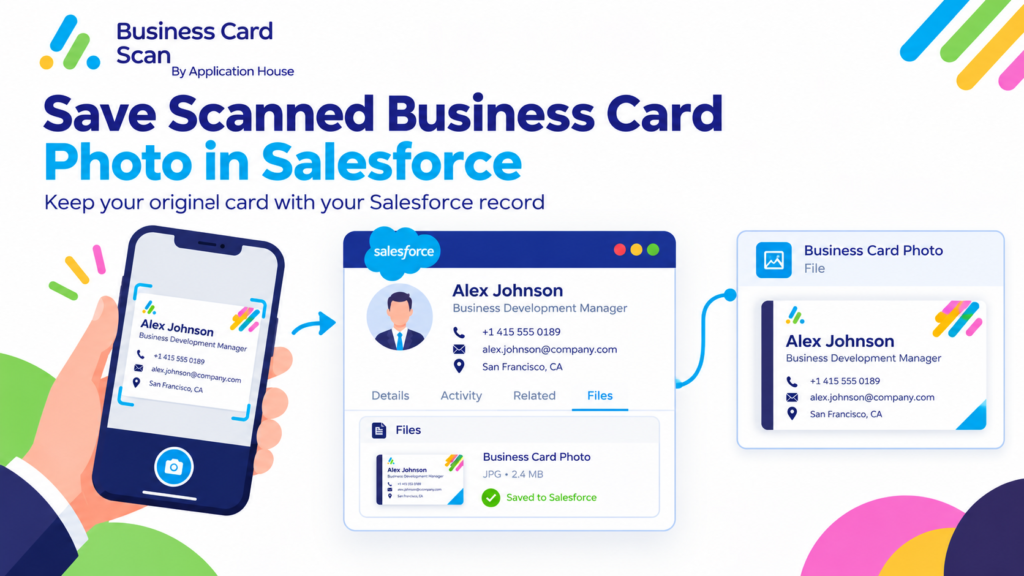
You can use Application House Business Card Scan App to keep your original scanned business card photo with your Salesforce record when your organisation wants to retain it.
You can save your card image as a Salesforce File while your structured information remains available through the Salesforce fields your team uses every day.
You can therefore keep both your usable Salesforce data and your original source card together when your business process benefits from having both.
Why Save a Scanned Business Card Photo in Salesforce
You may capture your person’s name, company, job title, email address and telephone number into separate Salesforce fields, but your original card represents the information your customer actually gave you.
You can keep your original image when your sales or account team may need to look back at your source later.
You can give your users a quick way to compare your structured Salesforce information with your original business card without searching through photographs, emails or desk drawers.
You can make your Salesforce record a more complete reference for your customer relationship.
Save the Original Business Card Photo
You can keep the picture of your original business card with your Salesforce record instead of losing your source image after your scanned information has been captured.
You can save your original business card photo as a Salesforce File on your record, so your authorised Salesforce users can refer back to your card from the record where your customer information is stored.
You can let your administrator choose which Salesforce objects may keep your business card photo, so your organisation controls where retaining your original image provides business value.
You can decide scan by scan whether you want to keep your original card by using the Save card photo switch.
You will find your Save card photo switch starts off, so your business card image is not automatically retained when you do not need it.
You can switch your option on when your particular customer, prospect, partner or business relationship makes your original card useful to keep.
Your Administrator Chooses Which Objects Can Keep the Photo
You may want your Contact record to keep your original business card photo while another Salesforce object only needs your structured information.
You can let your administrator decide which configured objects are allowed to retain your card image.
You can therefore apply your own business policy instead of automatically saving your card photo against every Salesforce object.
You can keep your card images where your organisation sees business value while your other records remain focused on structured Salesforce data.
You Decide Whether to Save Each Business Card Photo
You may want to keep your card from an important customer meeting while another routine contact does not require your image.
You can make your decision for each individual scan through your Save card photo switch.
You can leave your switch off when your structured Salesforce information is enough, or you can switch it on when your original card provides useful business context.
You can keep the Power in Your Hands because your administrator controls where your card may be stored while your scanning user controls whether your particular card is actually saved.
Keep Your Original Business Card with Your Salesforce Record
You may receive your business card during a meeting and then pass your customer relationship to another member of your team several weeks later.
You can save your scanned card photo with your Salesforce record so your next user can see the original source behind your captured information.
You can keep your card alongside the record your organisation uses instead of leaving your source image on one salesperson’s mobile phone.
You can make your customer information easier to hand over because your structured fields and your original source can stay together in Salesforce.
Support Sales Team Handover
You may have your business development representative make the first contact while your account executive manages your opportunity later.
You can let your first representative save your business card photo with your Salesforce record when your organisation wants that source retained.
You can give your account executive access to your original card through the Salesforce record your team already uses.
You can help your next user understand where your captured contact information came from without asking your original salesperson to find the physical card again.
Check Your Captured Details Against Your Original Card
You may want to confirm your spelling, telephone number, job title or company information after your scan has already been saved.
You can open your saved business card photo and compare your original printed information with your Salesforce fields.
You can use your original source when your team notices something unusual in your captured data.
You can correct your Salesforce information with more confidence because you can refer back to the card your customer actually provided.
Check Unusual Names and Company Details
You may work with international customers where your person’s name or company name is unfamiliar to your sales team.
You can retain your original business card photo so your user can check your printed source if your team later questions a spelling or company detail.
You can keep your visual reference available alongside your structured Salesforce information.
You can reduce your dependence on somebody remembering exactly what your physical card looked like after your meeting has passed.
Keep Useful Information That Your Fields May Not Capture
You may choose to map only the information your Salesforce process actually needs.
You may still find that your business card contains secondary information that was not mapped into one of your Salesforce fields.
You can keep your original card photo when your team may want to refer to that information later.
You can avoid creating unnecessary Salesforce fields simply because your card contains additional information that your business rarely needs.
Keep Additional Office or Department Information
You may receive your card with your head office address, branch address, department name or another printed detail that your current Salesforce process does not store separately.
You can retain your original card image without forcing your organisation to change your Salesforce data model for every occasional piece of information.
You can continue to keep your important information structured while your source card remains available for reference.
You can give your users another place to check your original details when your business situation requires them.
Save Your Business Card Photo for Important Account Relationships
You may value the original more when your person is an important stakeholder within one of your strategic Accounts.
You can keep your card image with your Salesforce record when your account team wants the source behind your stakeholder information available over the life of your relationship.
You can let your wider account team refer to your original card even when the salesperson who received it is no longer responsible for your Account.
You can keep your relationship information inside your shared Salesforce process instead of depending on one person’s private collection of business cards.
Explore our Business Card Scanner App on Salesforce AppExchange to discover its features and capabilities.
Enterprise Software Sales Example
You may sell enterprise software and receive your chief information officer’s business card during an executive meeting.
You can scan your card into Salesforce and save your structured contact information for your sales process.
You can also keep your original card photo with your record when your account team wants your source available for future reference.
You can give your sales director, account executive and customer success team access to the same original information through your Salesforce record.
Save Your Scanned Card During Professional Services Business Development
You may work in consulting, legal services, accounting, engineering or another professional services business where your client relationships involve several people from the same organisation.
You can retain your original card when your new stakeholder becomes part of a wider client relationship.
You can give your business development and delivery teams access to your source contact information through Salesforce.
You can help your teams work from your shared customer record rather than from business cards held by individual consultants.
Consulting Client Example
You may receive your finance director’s card during your project steering meeting while your organisation already works with several people at your client.
You can save your new person’s information into Salesforce and keep your scanned card photo with your configured record.
You can let your account team refer back to your card when your relationship expands to another project or service.
You can keep your original introduction connected with your longer term client history.
Keep Your Original Card in Recruitment and Staffing
You may meet your hiring manager at an industry event, customer office or recruitment meeting.
You can capture your person’s information into your Salesforce process while your original business card remains available with your record when you choose to save it.
You can give your consultants a shared source when your hiring manager later works with another member of your recruitment team.
You can reduce your dependence on personal notebooks, card holders or mobile photo galleries when your client relationship belongs to your wider business.
Keep Your Card with Property and Commercial Real Estate Contacts
You may work with your developers, investors, property managers, landlords or commercial tenants across long sales cycles.
You can retain your scanned card photo when your contact becomes part of an important property relationship.
You can keep your original source accessible through Salesforce when your transaction moves from business development to another team.
You can give your users access to your customer’s original printed information while your structured Salesforce data continues to support your normal process.
Keep Your Supplier and Partner Business Cards in Salesforce
You may also receive important business cards from your suppliers, distributors, resellers and business partners rather than only from sales prospects.
You can save your original card photo when your relationship needs to be shared across procurement, sales, operations or partner management teams.
You can keep your partner’s original contact source with your Salesforce record instead of leaving your card with the employee who first received it.
You can make your supplier and partner relationships easier for your organisation to maintain over time.
Distributor Relationship Example
You may meet your distributor director during your annual partner meeting and receive your new business card.
You can capture your person’s information into the Salesforce records your channel team uses.
You can keep your original card photo with your record when your team wants your printed contact source available to other partner managers.
You can preserve your business context when responsibility for your distributor later moves to another member of your team.
Choose Which Salesforce Objects Can Keep Your Card Photo
You may not want your business card image saved against every type of Salesforce record.
You can let your administrator decide which configured objects may keep your original business card photo.
You can therefore make your photo retention part of your business process instead of applying the same choice everywhere.
You can give your organisation control over where your source card is useful and where your structured Salesforce data is sufficient.
Keep Photos Only Where Your Business Needs Them
You may decide that your Contact records should be able to keep your business card photo while another configured object does not need your image.
You can configure your eligible objects according to how your organisation uses your data.
You can keep your Salesforce records focused by storing your card photo where your team sees genuine business value.
You can avoid treating photo retention as an automatic requirement for every scan and every record.
Decide Whether to Save Your Photo on Each Scan
You may want to keep your original card for one important customer while another routine contact does not require your image.
You can decide during your individual scan whether your card photo should be saved when your administrator has enabled that option for your object.
You can keep your Save card photo option switched off when your original image is not required.
You can switch your option on when your business context makes your original card useful.
You can therefore make your decision at the point where you understand the value of your card instead of saving every image automatically.
Keep Your Salesforce Storage Purposeful
You may not want to store every business card image simply because your application can save it.
You can leave your card photo unsaved when your structured Salesforce information gives your team everything it needs.
You can choose to retain your card only where your organisation has a useful business reason.
You can keep the Power in Your Hands by deciding which card images add value to your customer record.
Save Your Business Card Photo as a Salesforce File
You can keep your original business card picture as a Salesforce File on your configured record.
You can keep your source within the Salesforce environment your authorised users already work in.
You can avoid creating another external image library simply for your retained business cards.
You can make your original card part of your normal Salesforce record experience while your captured details remain available in your structured fields.
Keep Structured Data and Your Original Source Together
You still need your name, email address, company, job title and telephone number in structured Salesforce fields because your sales process needs usable data.
You do not need to choose between your structured Salesforce information and your original card image when your business benefits from both.
You can use your structured fields for your normal Salesforce process while your saved card photo gives your team the original source for reference.
You can give your users the convenience of usable CRM information together with the context of the card your customer actually handed to you.
Make Your Original Business Card Part of Your Customer History
You may build your customer relationship over months or years after your first introduction.
You can retain your original card with your Salesforce record when your organisation considers your source useful to that relationship.
You can let future account owners see your original information without needing access to your first salesperson’s files.
You can make your business card part of your shared customer history rather than a temporary object that disappears after your scan.
Put the Power in Your Hands
You understand whether your original business card has value beyond the structured data you capture from it.
You can let your administrator decide which Salesforce objects may retain your card photo.
You can let your user decide whether your particular scan should keep your image.
You can therefore retain your original card when your business needs it and leave your image unsaved when your structured data is enough.
Explore our Business Card Scanner App on Salesforce AppExchange to discover its features and capabilities.
Save Scanned Business Card Photo in Salesforce with Application House
You can use Application House Business Card Scan App to capture your business card information and keep your original card photo with your Salesforce record when your business process requires it.
You can save your card image as a Salesforce File while your structured Salesforce fields continue to support your sales, account management and customer processes.
You can give your teams access to your original source when they need to verify information, understand a handover or refer back to the card your customer provided.
You can keep control by choosing which Salesforce objects may store your image and deciding scan by scan whether your original business card photo should be saved.
Frequently Asked Questions (FAQs)
1. Can I save a scanned business card photo directly to a Salesforce record?
Yes. You can use the Application House Business Card Scan App to save your original scanned business card photo as a Salesforce File on your configured Salesforce record. This allows you to keep the original card image alongside structured contact information.
2. How do I save an original business card image in Salesforce?
You can use the Business Card Scan App to scan your business card and enable the Save card photo switch before saving the record. The original card image is then stored as a Salesforce File on the configured record, when your administrator has enabled photo storage for that Salesforce object.
3. Can I save a business card photo as a Salesforce File?
Yes. You can save your original scanned business card image as a Salesforce File. This keeps the image within Salesforce and makes it accessible to authorised users through the associated record.
4. Does Salesforce automatically save every scanned business card photo?
No. The Save card photo option is switched off by default. You can decide whether to save the original image for each individual scan, giving you control over which business card photos are retained in Salesforce.
5. Can I choose which Salesforce objects can store business card photos?
Yes. Your Salesforce administrator can configure which Salesforce objects are allowed to retain scanned business card photos. This means you can enable photo storage for objects such as Contacts while leaving it disabled for other objects.
6. Can I save a business card photo without creating additional Salesforce fields?
Yes. You can save the original business card image as a Salesforce File without creating separate Salesforce fields for every detail printed on the card. Your structured contact information remains in its mapped fields, while the original image preserves additional information for future reference.
7. Can I view the original business card photo after saving it to Salesforce?
Yes. You can access the saved business card photo from its associated Salesforce record, subject to your Salesforce file access permissions. This allows you to refer to the original card whenever you need to verify contact information.
8. Can I compare scanned Salesforce contact details with the original business card?
Yes. You can open the saved business card photo and compare it with your Salesforce fields. This helps you verify names, company details, job titles, telephone numbers and email addresses against the original printed information.
9. Can multiple Salesforce users access the same saved business card photo?
Yes. Other authorised Salesforce users who have access to the associated record and its file can refer to the saved business card photo. This helps your sales and account management teams share original contact information.
10. How does saving business card photos in Salesforce help with sales team handovers?
Saving the original business card photo with a Salesforce record helps your next account owner understand where the contact information came from. Your sales representatives can access the original card through Salesforce instead of asking the previous owner to find a photograph or physical card.
11. Can I save business card photos for important customer and partner relationships?
Yes. You can choose to retain original business card photos for important customers, suppliers, distributors, partners and business stakeholders. This gives your wider team access to the original contact information throughout the relationship.
12. Does saving business card photos affect structured Salesforce contact information?
No. The original business card photo and structured Salesforce information serve different purposes. Your name, email address, company and telephone number remain available in their respective Salesforce fields, while the original image provides a visual reference.