Scan Multi Language Business Cards in Local Language
You may meet your customers in London, Tokyo, Seoul, Dubai, Delhi, Istanbul or another market while your business card contains information written in your customer’s local language.
You should not need your salesperson to understand every language or writing system before your customer information can become useful Salesforce data.
You can use Application House Business Card Scan App to read your international business card directly from your card image and capture your available contact information.
You can use your captured information to create your Lead, Contact, Contact and Account, Campaign Member or another Salesforce record according to your configured business process.
You can give your local sales team a simple scanning experience while your wider organisation receives customer information through your existing Salesforce process.
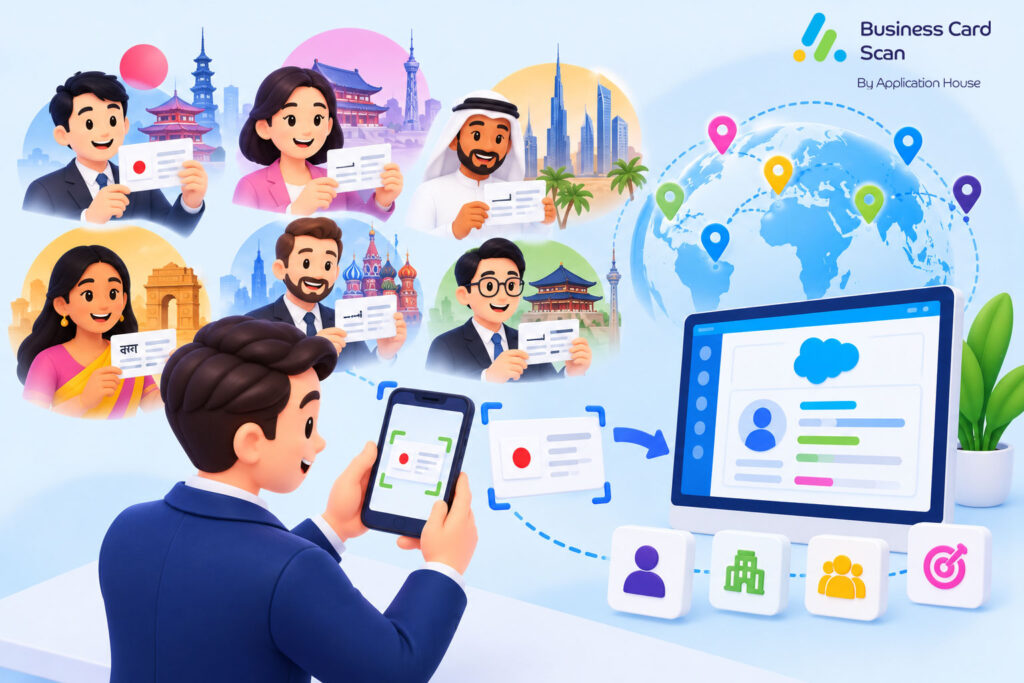
Scan Business Cards in Your Customer's Local Language
You may receive your prospect’s card in English, Japanese, Chinese, Korean, Arabic, Hebrew, Greek, Russian, Thai, Hindi, Vietnamese, Turkish or another supported language.
You can scan your business card without manually choosing your language or writing system before you start.
You can let your app read your available information directly from your business card image.
You can review your captured information before you save your Salesforce records.
You can make your international customer information part of your normal Salesforce process instead of asking your regional salesperson to retype your card manually.
OCR Language Support for Multi Language Business Card Scan
You can use Photo Scan as the simplest and recommended way to scan your international business cards.
You can let your Photo Scan read your business card directly from your image without asking you to select your language first.
You can use your Photo Scan with cards in most languages while your sales user follows the same simple scanning process.
You can give your international sales teams one Business Card Scan process instead of teaching your users a different scanning method for every country.
You Do Not Need to Select Your Language
You can take your business card photo and let your Photo Scan read the information available in your image.
You do not need to tell your app whether your card uses English, Japanese, Chinese, Arabic or another supported language before you scan it.
You can make your scanning easier at international events where you may receive cards from several different countries during the same day.
You can keep your salesperson focused on your customer conversation instead of asking your user to identify the writing system behind every card.
Languages Tested with Photo Scan
You can use your Photo Scan with business cards in most languages.
You can use your tested scanning with English and the main European languages, Japanese, Chinese, Korean, Arabic, Hebrew, Greek, Russian, Thai, Hindi, Vietnamese and Turkish.
You can support your regional sales teams across major European, Asian and Middle Eastern markets through the same Business Card Scan process.
You can continue using your configured Salesforce records and fields regardless of which supported language your customer uses on your business card.
No Additional Charge for Supported Languages
You can scan your business cards in supported languages without paying an additional language scanning charge.
You can let your international teams use your same Business Card Scan App across your supported markets without adding another charge simply because your customer uses another language.
You can expand your scanning process across your international sales teams while your supported language capability remains part of your existing app usage.
Use One Photo Scan Across Your International Sales Team
You may have your salesperson in London scan your English card, your salesperson in Tokyo scan your Japanese card and your salesperson in Dubai scan your Arabic card.
You can give your users the same Photo Scan experience instead of creating a different scanning process for each market.
You can let your app handle your supported language recognition while your Salesforce configuration continues to control which records and fields your scan uses.
You can reduce your user training because your salesperson does not need to learn a separate language selection process.
You can keep your international scanning simple for your users while your administrator keeps control over your Salesforce business process.
Create Lead from Multi Language Business Card Scan
You may meet your completely new prospect at an international exhibition where your business card is written mainly in your customer’s local language.
You can use your Business Card Scan to capture your available information and create your Lead when your configured Salesforce process treats your person as a new prospect.
You can review your captured name, company, job title and other available details before your Lead is saved.
You can let your salesperson continue your conversation instead of spending your event time entering your business card into Salesforce manually.
You can give your central sales team a usable Lead even when your first interaction happened in another language.
Japanese Exhibition Sales Example
You may have your UK software company exhibit in Tokyo while your salesperson meets your hotel technology manager and receives your Japanese business card.
You can scan your Japanese card with Photo Scan without asking your user to select Japanese before your scan.
You can create your Lead according to your configured Salesforce process when your person is genuinely new to your organisation.
You can let your sales operations team continue your sales process without asking your regional salesperson to rebuild your contact manually.
Middle East New Business Example
You may meet your operations director at an event in Dubai where your card contains Arabic information.
You can scan your local language card and capture your available information for your Salesforce process.
You can create your Lead when your prospect enters your new business process.
You can give your wider organisation useful Salesforce information while your original customer relationship remains rooted in your local market.
Create Contact from Multi Language Business Card Scan
You may already know your customer’s organisation while your new stakeholder gives you a local language business card.
You can scan your card and create your Contact when your configured Salesforce process requires your new person to become part of your customer relationship.
You can place your captured information into the Salesforce fields your organisation already uses.
You can make your international stakeholder available to your wider account team instead of leaving your new relationship known only to your regional salesperson.
You can keep your customer relationship more complete as your organisation meets new people across different countries.
Global Customer Stakeholder Example
You may already supply your multinational customer in Europe while your regional team meets your new procurement manager in South Korea.
You can scan your Korean business card and create your Contact according to your configured Salesforce process.
You can let your global account team work with your new stakeholder even when your first introduction happened through your regional office.
You can strengthen your shared account knowledge because your new person becomes available through Salesforce rather than remaining in your salesperson’s local contacts.
Create Contact and Account from Multi Language Business Card Scan
You may enter a new international market where both your person and your organisation are new to your Salesforce data.
You can use your Business Card Scan to capture your customer’s local language card and create your Contact and Account when your configured process requires both records.
You can relate your Contact to your Account so your wider sales team understands which international organisation your person represents.
You can give your international prospect a proper business context rather than storing your captured person as an isolated contact.
International Distributor Example
You may manufacture industrial products in the United Kingdom while your export salesperson meets your new distributor in India.
You can scan your distributor director’s business card and use your captured information within your configured Salesforce process.
You can create your Account for your distributor and your Contact for your person when your organisation needs both records.
You can relate your records so your wider team immediately understands which distributor your new person represents.
You can let your export sales, finance and account teams work from the same international customer relationship after your meeting.
International Professional Services Example
You may have your consultancy enter a new European market and receive your finance director’s card during your first customer meeting.
You can scan your local language business card and create your new client Account and Contact when your configured process requires them.
You can relate your Contact to your Account from the beginning of your Salesforce relationship.
You can give your business development team usable international client information without asking your consultant to enter your card manually.
Create Campaign Member from Multi Language Business Card Scan
You may run your exhibition, conference or customer event in another country while your attendees provide business cards in their local languages.
You can scan your prospect and use your configured Campaign Member process to connect your person with your Salesforce Campaign.
You can use your existing Contact where your person is already known or your Lead where your process requires a new prospect.
You can keep your international event activity connected with your Campaign instead of returning home with your local language cards separated from your event reporting.
You can give your marketing and sales teams useful Campaign information regardless of which supported language your attendee used on your card.
International Trade Show Example
You may exhibit at your manufacturing trade show in Germany while your team meets buyers from several European and international markets.
You can scan your different language business cards through your same Photo Scan process.
You can connect your appropriate Contact or Lead with your Campaign according to your configured Salesforce process.
You can let your headquarters understand which prospects your international event produced without asking your regional users to manually enter every card.
You can make your post event sales activity start from structured Salesforce information rather than from a collection of international business cards.
Global Technology Conference Example
You may attend your technology conference while your visitors represent businesses from China, Japan, South Korea, India, Turkey and other markets.
You can scan your supported local language cards and use your Campaign process for your relevant prospects.
You can give your sales team useful Campaign context while your regional users continue working with your customers locally.
You can make your international Campaign activity part of your shared Salesforce process.
Create Any Salesforce Record from Multi Language Business Card Scan
You may have your international business process built around more than your Lead, Contact, Account and Campaign Member.
You can configure your Business Card Scan App to use any standard or custom Salesforce object that your administrator can access and create.
You can map your scanned information into your chosen Salesforce fields and relate your records according to your organisation’s business process.
You can use your international scanning capability without forcing every customer into the same standard Salesforce record structure.
You can make your local language business card part of your industry specific Salesforce process.
Explore our Business Card Scanner App on Salesforce AppExchange to discover its features and capabilities.
Hotel Technology Example
You may sell your technology to international hotels while your Salesforce organisation uses Hotel or Property records alongside your Contacts and Accounts.
You can scan your hotel manager’s local language business card and use your configured Salesforce records around your hospitality sales process.
You can relate your person to your hotel data and place your captured details in the fields your organisation actually uses.
You can make your international hotel contact useful to your sales team instead of simply storing your person’s name and telephone number.
International Channel Sales Example
You may manage your distributors through custom Salesforce records because your channel model differs from your direct sales process.
You can scan your distributor representative’s local language card and create or relate your records according to your configured process.
You can put your captured information into your chosen fields while your distributor relationship remains part of your existing Salesforce structure.
You can let your regional teams work locally while your headquarters uses your shared Salesforce customer data.
Use Multi Language Business Card Scan for Global Account Management
You may have your customer operate across several countries while your global Account is managed by one central Salesforce team.
You can let your regional users capture local stakeholders from the business cards your customers actually use.
You can help your global account manager understand your stakeholder network without asking every region to maintain a separate customer database.
You can give your organisation one shared Salesforce process while your customer relationships continue naturally in local markets.
Global Hotel Group Example
You may sell your software to an international hotel group with properties in Europe, Japan, India and the Middle East.
You can let your regional salesperson scan your hotel manager’s local language business card in each market.
You can capture your local stakeholder while your wider Account team works from your shared Salesforce information.
You can make your international Account relationship easier to manage because your local contact capture becomes part of your global customer data.
Use Multi Language Business Card Scan for Export Sales
You may manufacture your products in one country while your distributors and customers operate around the world.
You can scan your local distributor and buyer business cards without asking your export salesperson to manually enter every card.
You can create the Salesforce records your export sales process requires while your regional customer information remains connected with your wider organisation.
You can give your export team a practical way to move from your international meeting to your Salesforce sales process.
Use Multi Language Business Card Scan for International Recruitment
You may have your recruitment business work with employers and hiring managers across several countries.
You can scan your hiring manager’s local language business card and bring your available details into your configured Salesforce process.
You can relate your new stakeholder to your client Account or another configured recruitment record.
You can keep your international client relationship visible to your wider recruitment team instead of leaving your contact information with one local consultant.
Use Multi Language Business Card Scan for International Professional Services
You may have your consultants meet customers across offices, conferences and international projects.
You can scan your client’s local language card and make your available details useful through your Salesforce process.
You can create your configured Contact, Account or another record according to your client management process.
You can let your delivery and account teams work from your shared Salesforce information even when your original introduction took place in another language.
Use Business Card Scan, QR Code Scan, Barcode Scan and Badge Scan in Your Salesforce Process
You may receive your customer’s information in several different forms while your international sales process still needs your data inside Salesforce.
You can use your Business Card Scan when your customer gives you a physical or supported digital business card.
You can use your QR Code Scan when your customer provides supported contact information through your QR code or digital business card link.
You can use your Barcode Scan when your supported barcode contains information your scanning process can capture.
You can use your Badge Scan when your event badge provides your person’s printed information for your event capture process.
You can keep your configured Salesforce process consistent even when your customer information reaches you through different capture methods.
Business Card Scan
You can use your Business Card Scan with your local and international business cards through your Photo Scan process.
You can let your app read your supported language directly from your business card image.
You can continue through your configured Salesforce review and save process after your information is captured.
You can make your traditional business card useful across both your local market and your international Salesforce process.
QR Code Scan
You can use your QR Code Scan when your customer shares your supported contact code or digital business card link.
You can bring your captured information into the Salesforce process your administrator has configured.
You can keep your digital contact capture aligned with the records and fields your wider business already uses.
You can use your Salesforce mobile app when your process requires your QR Code Scan.
Barcode Scan
You can use your Barcode Scan when your supported barcode contains contact information or another supported business card source.
You can continue through your configured Salesforce process after your supported information is captured.
You can avoid building another business process simply because your contact information arrived through your barcode rather than your printed card.
You can use your Salesforce mobile app when your process requires your Barcode Scan.
Badge Scan
You can use your Badge Scan when your event badge contains your person’s printed information and your code itself does not provide your complete attendee details.
You can let your Badge Scan read your printed attendee information while your event branding and role words are ignored where your badge process applies.
You can then continue through your configured Salesforce process for your event contact.
You can give your international exhibition team another practical way to capture your prospects while your Salesforce record structure remains consistent.
Scan Multi Language Business Cards in Local Language with Application House
You can use Application House Business Card Scan App when your sales team receives business cards written in your customer’s local language.
You can use Photo Scan without selecting your language or writing system before your scan.
You can scan your supported cards in English and the main European languages, Japanese, Chinese, Korean, Arabic, Hebrew, Greek, Russian, Thai, Hindi, Vietnamese and Turkish.
You can create your Lead, Contact, Contact and Account, Campaign Member or another configured Salesforce record from your captured information.
You can use your Business Card Scan alongside your QR Code Scan, Barcode Scan and Badge Scan while your configured Salesforce process controls the records and fields your organisation uses.
You can scan your cards in supported languages without paying an additional language scanning charge.
You can let your customers use their local language while your sales team keeps your contact capture inside the Salesforce process your organisation already uses.
Frequently Asked Questions
1. Can I scan business cards written in different languages into Salesforce?
Yes. You can use Application House Business Card Scan App to scan business cards written in different supported languages and capture the available contact information directly from the card image. You can then create Salesforce records using your configured process.
2. Do I need to select the language before scanning a business card?
No. You can use Photo Scan without manually selecting the language or writing system before scanning. The app can recognise supported languages directly from your business card image.
3. Which languages are supported by the Business Card Scan App?
You can scan business cards in English, major European languages, Japanese, Chinese, Korean, Arabic, Hebrew, Greek, Russian, Thai, Hindi, Vietnamese and Turkish. Language recognition depends on the supported writing system and the quality of the card image.
4. Can I scan Japanese, Chinese and Arabic business cards into Salesforce?
Yes. You can use Photo Scan to capture available information from Japanese, Chinese and Arabic business cards without manually selecting the language first. You can then review the captured information and save it to your configured Salesforce records.
5. Does multi-language business card scanning require an additional charge?
No. You can scan business cards in supported languages without paying an additional language scanning charge. The language scanning capability is included in your existing app usage.
6. Can I create Salesforce Leads from international business cards?
Yes. You can scan an international business card and create a Salesforce Lead using the captured information. You can review details such as the person’s name, company and job title before saving the record.
7. Can I create Salesforce Contacts and Accounts from multi-language business cards?
Yes. You can capture information from a supported local-language business card and create a Salesforce Contact and Account. You can also relate the Contact to the appropriate Account using your configured Salesforce process.
8. Can I create Campaign Members by scanning international business cards at exhibitions?
Yes. You can scan international business cards at exhibitions, conferences and trade shows and connect the appropriate Lead or Contact with your Salesforce Campaign. This helps you keep your international event leads connected with your Campaign records.
9. Can I scan multi-language business cards into custom Salesforce objects?
Yes. You can configure the Business Card Scan App to create standard or custom Salesforce objects that your administrator can access and create. You can also map captured information to your chosen Salesforce fields.
10. Can international sales teams use the same business card scanning process?
Yes. Your international sales teams can use the same Photo Scan process to capture supported business cards in different languages. Your users do not need to follow separate scanning procedures for different countries.