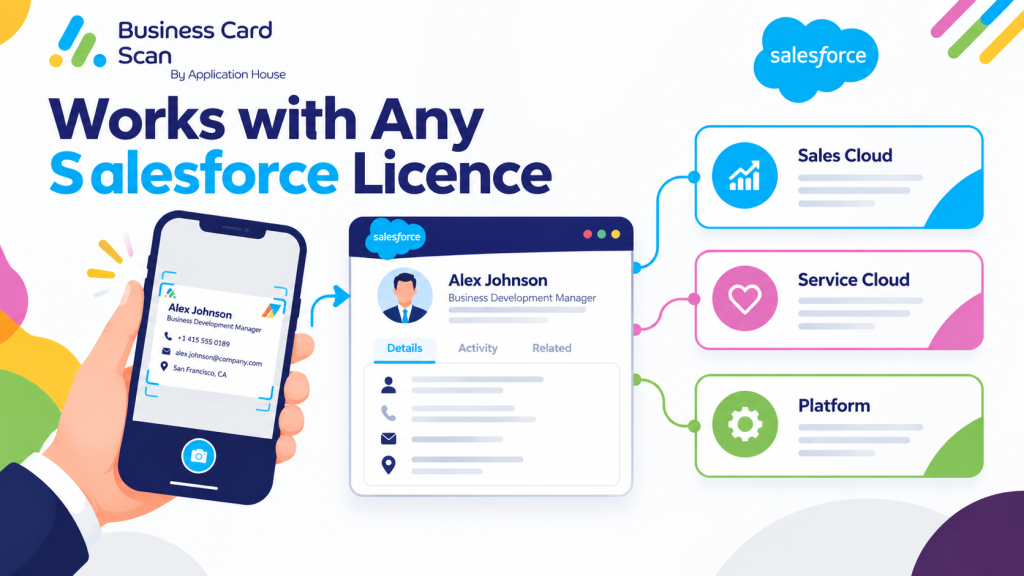
App Works with any Salesforce Licence
Your business card scanner should work around your Salesforce process, because your sales team may not all use the same Salesforce licence or even the same Salesforce objects.
You can use Application House Business Card Scan App with Sales Cloud, Service Cloud and Salesforce Platform users, while your scan works with the Salesforce records your users are allowed to access. You can use Leads and Campaigns where your organisation has them, while you can still scan into Contacts, Accounts or your own custom objects where those standard sales objects are not available. Feature-Descriptions Business-C…
You can therefore design your business card scanning process around your actual business data instead of buying another Salesforce licence simply because a conventional scanner expects every user to create a Lead.
Your Salesforce Licence Should Not Decide Your Business Card Scan Process
Your organisation may use Salesforce differently from another company, so your business card data does not always belong in the same standard Salesforce object.
You may use Lead, Contact, Account and Opportunity when your sales team has full Salesforce CRM access.
You may use Contact, Account and your own custom sales objects when your users have Salesforce Platform licences.
You may also have different teams using different Salesforce licences while your business still needs every scanned contact to enter the correct business process.
You can configure Business Card Scan App around those differences because your administrator chooses which records your scan creates, which fields your scan fills and how your records relate to your existing Salesforce data.
Use Business Card Scan with Sales Cloud
Your Sales Cloud users commonly work with Leads, Contacts, Accounts, Opportunities and Campaigns, so you can make your business card scan part of your complete prospect to sales process.
You can scan your prospect at an exhibition, find your existing Salesforce record, create your Lead when required, relate your Contact to your Account and connect your person with your Campaign.
You can also create your follow up Task during your scan so your next sales action is already recorded when your representative moves to the next prospect.
Your full Salesforce user licence is designed for users who need access to standard CRM objects and AppExchange applications, so your Sales Cloud sales users can work with the broader CRM process your organisation has configured. Salesforce
Hotel Software Sales Example
Your hotel software salesperson may meet a hotel general manager at a hospitality exhibition and receive a business card.
You can scan your hotel manager’s card and first use your Salesforce data to identify the Hotel Account that your company already sells to.
You can relate your scanned Contact to your existing Hotel Account instead of creating another version of the hotel.
You can then create your Lead, Opportunity, Task or other configured sales record where your Salesforce process requires it.
You can therefore turn one business card into business data that already understands which hotel, decision maker and sales relationship your representative is working with.
Use Business Card Scan with Service Cloud
Your Service Cloud organisation may use Contacts, Accounts, Cases and custom objects as heavily as your traditional sales objects.
You can use your Business Card Scan App when your customer service, account management or field teams meet customers and need to capture new people against your existing customer data.
You can scan your customer’s card, find your Account, create or update your Contact and relate your person to the records your service process already uses.
You can keep your captured person connected with your customer history rather than sending your business card information into a separate contact database.
Industrial Equipment Service Example
Your equipment company may have service managers visiting factories where your Salesforce Account represents the customer site.
You can scan your plant manager’s business card and match your company information with your existing Account before your new Contact is saved.
You can then relate your Contact to your Account and create your Task or custom Visit record according to your own service process.
You can give your service and sales teams the same customer context because your scanned data becomes part of your existing Salesforce records.
Explore our Business Card Scanner App on Salesforce AppExchange to discover its features and capabilities.
Use Business Card Scan with Salesforce Platform Licence
Your Salesforce Platform users may not need full CRM functionality, but your users can still work with custom applications, Accounts, Contacts, reports, dashboards and custom objects according to their Salesforce access. Salesforce states that Salesforce Platform users do not receive standard objects such as Leads, Campaigns and Opportunities. Salesforce
You can make this licence model useful for business card scanning because your Business Card Scan App does not require every scan to create a Lead.
You can configure your scan to use your Contacts, Accounts and custom objects instead, so your Platform users can capture business data around the Salesforce process your organisation has actually built.
Hotel Technology Platform Licence Example
Your hotel technology company may give your event representatives Salesforce Platform licences because your representatives work mainly with Hotel, Contact and Product Interest records rather than the complete Sales Cloud application.
You can scan your hotel manager’s business card and match your person with your Hotel Account before your app creates your Contact.
You can then create your custom Product Interest record and relate your record to your hotel and your new Contact.
You can avoid forcing your business to buy a full CRM licence simply because your scanner was designed only to create Leads.
Manufacturing Sales Example
Your manufacturing company may use a Distributor custom object because your channel sales process is different from a traditional direct sales model.
You can scan your distributor representative’s card and use your existing Salesforce Account, Contact and Distributor data during your scan.
You can create your custom Product Interest or Dealer Enquiry record and relate your new record to the correct customer relationship.
You can keep your business card scanner aligned with your channel sales process instead of forcing every distributor contact into a generic Lead structure.
Property and Real Estate Example
Your property organisation may keep Property, Development, Landlord or Tenant information in custom Salesforce objects.
You can scan your property manager, investor or supplier contact and relate your person to your existing property data before your related record is created.
You can configure your scan around the fields your property team actually uses, so your Salesforce licence and data model can work together.
Recruitment Example
Your recruitment business may use custom Vacancy, Candidate, Client or Placement records around your Contacts and Accounts.
You can scan your hiring manager’s business card and match your organisation with your existing client Account.
You can then create your Contact and relate your person to your Vacancy or Recruitment Enquiry record.
You can use your business card capture as the start of your recruitment workflow rather than simply storing another name and email address.
What Is a Lightning Platform Licence?
Your team may use the term Lightning licence when you actually mean Lightning Platform Starter or Lightning Platform Plus.
You can treat these products as part of the Salesforce Platform family because Salesforce states that Lightning Platform Starter and Lightning Platform Plus contain the Salesforce Platform user licence. Salesforce
You can therefore design your business process around the objects your particular Platform entitlement provides, while your administrator still controls which objects and fields your Business Card Scan App uses.
You should always check your actual user licence and object permissions in Salesforce Setup because your available objects depend on your purchased licence, permissions and organisation configuration. Salesforce
What Is Salesforce Platform Login?
Your organisation may have users who need your custom Salesforce applications only occasionally instead of every working day.
You can use Salesforce Platform Login as a login based licensing model because Salesforce describes it as providing the same access and functionality as Salesforce Platform, with consumption based on user logins rather than a dedicated seat. Salesforce
You should confirm your Application House app entitlement for your specific Platform Login deployment before you describe that licence as supported, because your current Business Card Scan App Release 1.5 specification explicitly names Salesforce Platform rather than Salesforce Platform Login.
Can You Use Chatter Free for Business Card Scanning?
Your Chatter Free users can access Chatter collaboration features, but you cannot treat Chatter Free as a replacement for a Salesforce Platform or full Salesforce licence for your business card scanning process.
You cannot use Chatter Free to work with Salesforce objects or business data because Salesforce states that Chatter Free users cannot access Salesforce objects or Salesforce data. Salesforce
You may see that Chatter Free users can access the Salesforce mobile app, but your mobile access still follows the data and functionality allowed by your user licence, profile and permissions. Salesforce
You therefore need a Salesforce licence that gives your user access to the records your Business Card Scan App needs to read or create.
What About Chatter Only or Chatter Plus?
Your organisation may still have legacy Chatter Only licences, which Salesforce also calls Chatter Plus.
You can give those users more access than Chatter Free, including Accounts, Contacts and a limited number of custom objects, according to Salesforce. Salesforce
You should not market Chatter Only as a supported Business Card Scan App licence without validating your deployment because your current Release 1.5 specification confirms Sales Cloud, Service Cloud and Salesforce Platform licences rather than Chatter Only.
What About Experience Cloud Licences?
Your Experience Cloud licences are designed mainly for external users who access a Salesforce site rather than your normal internal Salesforce organisation. Salesforce
You should not assume your Business Card Scan App supports every Experience Cloud licence because your current Release 1.5 product specification does not make that claim.
You can keep your website claim focused on the licences your app specification currently confirms instead of turning a strong flexibility message into an unsupported universal licensing statement.
Your Industry Can Decide Which Record the Scan Creates
Your greatest advantage is not simply that you can use different Salesforce licences.
You can configure your Business Card Scan App so your scanned data enters the Salesforce record that represents your real business process.
Hospitality Technology
Your salesperson can scan your hotel manager’s card, match your person with your Hotel Account and create your Contact, sales enquiry or Product Interest record.
Financial Services
Your relationship manager can scan your broker, adviser or corporate contact and relate your person to your Account, firm or other configured business record.
Education Technology
Your sales representative can scan your school administrator’s card and relate your Contact to your School Account and your product interest or engagement record.
Healthcare Technology
Your sales team can scan your clinic manager or healthcare professional and connect your Contact with your Clinic Account and your configured sales record, subject to your organisation’s Salesforce permissions and data policies.
Manufacturing
Your channel salesperson can scan your distributor, dealer or procurement contact and relate your person to your Account, Distributor or Product Interest data.
Real Estate
Your property salesperson can scan your developer, landlord, investor or property manager and connect your person with your Account, Property or Development records.
Recruitment
Your recruitment salesperson can scan your hiring manager and connect your Contact with your client Account, Vacancy or Recruitment Enquiry.
Professional Services
Your consultant or business development user can scan your decision maker and relate your Contact to your client Account, Opportunity or custom engagement process.
Your Salesforce Permissions Still Stay in Control
Your Business Card Scan App does not bypass your Salesforce security simply because your app can create different record types.
You can only work with the Salesforce objects and fields that your user is allowed to access, because your records remain inside your own Salesforce security, sharing and field access model. Feature-Descriptions Business-C…
You can therefore give different users different scanning experiences according to their Salesforce role, licence, permissions and business responsibility.
You Do Not Need to Buy a Different Salesforce Licence Just for the Scanner
Your Release 1.5 Business Card Scan App is designed so your scanner can use Sales Cloud, Service Cloud and Salesforce Platform licences rather than requiring your organisation to purchase a separate Salesforce licence purely for business card capture. Feature-Descriptions Business-C…
You can use Leads and Campaigns when your Salesforce environment provides them.
You can use Contacts, Accounts and custom objects when your users work with Salesforce Platform and your process does not use Lead or Campaign.
You can configure your scanner around your business data instead of configuring your business around the limitations of your scanner.
Works with Any Salesforce Licence Means Your Business Process Comes First
Your Business Card Scan App gives you the flexibility to use the Salesforce records your users already work with rather than assuming every scanned person must become the same type of CRM record.
You can let your Sales Cloud representative create a Lead, let your Platform user create a Contact and custom Product Interest record, and let your service team connect your new person to your existing Account.
You can make your licence investment work harder because your business card scan follows your Salesforce data model, permissions and business process.
You can put the power in your hands by deciding what your scan creates, which fields your scan fills and how your new records relate to the Salesforce data your organisation already owns.
Frequently Asked Questions
1. Does Businesscardscan work with Salesforce Platform licences?
Yes. Businesscardscan supports Salesforce Platform users under its specified app entitlement. You can configure scanning to use accessible records such as Contacts, Accounts and custom objects rather than depending on Leads and Campaigns.
2. Can you scan business cards into Salesforce custom objects?
Yes. You can configure Businesscardscan to create records in supported custom Salesforce objects and map scanned information to the fields available to your users.
3. Can you use Businesscardscan with Salesforce Sales Cloud?
Yes. You can use Businesscardscan with supported Salesforce users working with Sales Cloud. You can configure your scanning process around available records such as Leads, Contacts, Accounts and Campaigns.
4. Can you use Businesscardscan with Salesforce Service Cloud?
Yes. You can configure your scanning process around accessible customer records, including Contacts, Accounts and supported custom objects used by your service teams.
5. Do Salesforce Platform users need access to Leads to scan business cards?
No. Salesforce Platform users can use supported scanning workflows based on the objects available to their licence. You can configure your process around Contacts, Accounts and custom objects instead of relying on Leads.
6. Does Businesscardscan bypass Salesforce user permissions?
No. Your Salesforce permissions still control which objects, records and fields your users can access. Businesscardscan works within the access available to your Salesforce users.
7. Can different Salesforce users follow different scanning processes?
You can configure your scanning process around your organisation’s Salesforce data model and user access. The exact configurations available depend on your Businesscardscan setup and app entitlement.
8. Do you need to purchase a separate Salesforce licence just for business card scanning?
You need an appropriate Salesforce user licence and the relevant Businesscardscan app entitlement. You should not assume that a restricted Salesforce licence automatically supports every scanning workflow.