Convert Local Language Business Cards into English
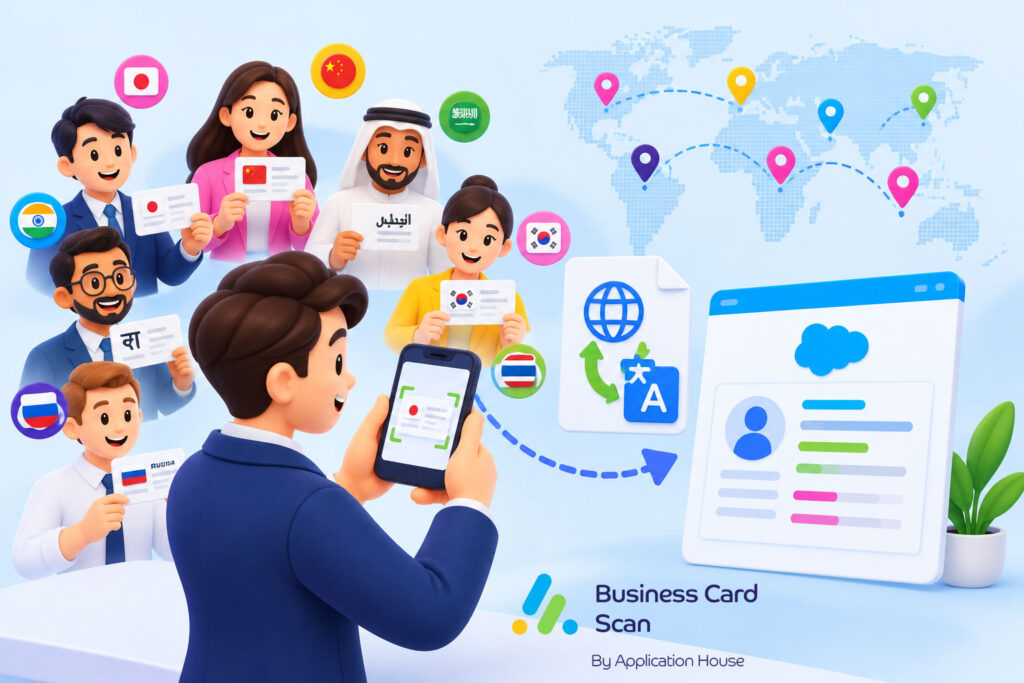
You may have your sales team meet customers in countries where your business cards use Japanese, Chinese, Korean, Arabic, Hindi, Greek, Russian, Thai or another local language.
You may understand your customer’s business card perfectly in your local office while your colleagues in another country cannot easily read your person’s name, job title, company information or address.
You can use Application House Business Card Scan App with your Convert to English option when your organisation needs your international business card information in a form your wider Salesforce team can understand.
You can keep your customer’s identity meaningful while you make your international contact information easier for your global sales, account management and operations teams to use.
You can then create your Lead, Contact, Contact and Account, Campaign Member or another configured Salesforce record using information that fits your wider business process.
Convert Local Language Business Card Scan to English
You can let your administrator enable Convert to English when your international Salesforce process needs your local language business card information presented in English.
You can scan your Business Card through your normal Photo Scan process and let your configured conversion work with the information captured from your card.
You can have your personal names written using English characters while your person’s identity remains your actual person’s name.
You can have your job titles and addresses translated into English so your colleagues can understand your customer’s business role and location.
You can save your country using its English name so your global Salesforce users work with more consistent geographic information.
You can give your wider organisation usable customer information without asking your regional salesperson to translate every card manually.
Convert Multi Language Business Cards into English
You may have your organisation receive business cards from many markets during the same exhibition, sales programme or international account relationship.
You can convert your captured information into English when your wider organisation needs a common working language.
You can let your regional salesperson continue working naturally with your local customer while your central Salesforce team receives information it can understand.
You can reduce your dependence on one regional employee whenever another team needs to understand your international Contact or Lead.
You can make your international customer data easier to share across your sales regions without creating another contact database for each language.
Give Your Global Team a Common Working Language
You may have your Japanese salesperson capture your customer in Tokyo while your opportunity is managed by your account director in London.
You can make your captured job title, address and country easier for your London team to understand when your Convert to English option is enabled.
You can help your account director recognise your person’s role in your buying process without asking your Japanese colleague to explain your card separately.
You can make your Salesforce record useful beyond the local team that originally received your business card.
Support International Sales Handover
You may have your regional business development user capture your prospect before your opportunity moves to another salesperson or specialist team.
You can use your English converted information to make your customer handover easier across your international organisation.
You can let your next user understand your person’s role and business location from your Salesforce record rather than from a separate translation note.
You can keep your customer knowledge within your shared Salesforce process when responsibility moves between your teams.
Convert International Business Cards into English
You may have your international sales strategy depend on people across Europe, Asia, the Middle East and other markets working from the same Salesforce organisation.
You can convert your local business card information into English when your global team needs your customer data in a more consistent format.
You can make your international stakeholder easier for your central account team, sales operations team and management team to understand.
You can keep your regional customer relationship local while your Salesforce data supports your wider international business.
International Software Sales Example
You may sell your software from the United Kingdom while your regional salesperson meets your chief technology officer in Japan.
You can scan your Japanese business card and use your Convert to English option for the information your wider team needs to understand.
You can make your person’s role and business location clearer to your UK account team while your customer relationship continues through your Japanese salesperson.
You can give your global team useful Salesforce context before your next demonstration, proposal or commercial discussion.
Write Personal Names Using English Characters
You may receive your person’s name in a writing system your wider Salesforce team cannot easily read.
You can have your personal name written using English characters when your Convert to English option is enabled.
You can keep your person’s actual identity because your personal name is represented using English characters rather than being translated into a different personal name.
You can make your Salesforce Contact or Lead easier for your international colleagues to recognise and search.
You can give your global users a practical representation of your customer without changing who your person is.
Keep Your Customer Name Meaningful
You may need your local salesperson and your international account manager to recognise the same person in Salesforce.
You can preserve your customer’s name while your English character representation makes your record easier for another team to use.
You can keep your accents where they form part of your customer’s information.
You can make your internationa
Use the Known English Company Name
You may work with an international company that has one local language company name and another recognised English business name.
You can use your company’s known English name where your conversion process identifies it.
You can help your global Salesforce users recognise your customer organisation more easily.
You can reduce your risk of one regional team referring to your company by a local name while another team knows your same organisation by its English name.
You can make your international account information easier for your wider organisation to understand.
Explore our Business Card Scanner App on Salesforce AppExchange to discover its features and capabilities.
Translate Job Titles into English
You may capture your person’s local job title correctly while your colleagues in another country do not understand what your title means.
You can translate your job title into English when your Convert to English option is enabled.
You can help your sales team understand whether your person works in procurement, operations, finance, technology, management or another business function.
You can give your account team useful information about your person’s likely role in your buying process.
You can make your captured title commercially useful to your wider team instead of storing text that only your local salesperson understands.
Translate Business Card Addresses into English
You may receive your customer’s office or business address written entirely in your local language.
You can translate your address into English when your Convert to English option is enabled.
You can make your customer’s location easier for your international sales, operations or account team to understand.
You can reduce your need for another user to interpret your local address when your customer relationship moves beyond your original regional team.
Save Your Country Using Its English Name
You may receive business cards from many countries while your organisation wants your Salesforce country information presented consistently.
You can save your country using its English name when your international business card is converted.
You can give your global Salesforce users a familiar country value even when your original business card was designed for your local market.
You can support your international account and sales processes with clearer geographic information.
You can make your customer location easier for your organisation to understand across different regions.
Identify Your Country from Your Dialling Code or Website
You may receive your local business card without your country printed because your card assumes your reader already knows your location.
You can let your app use your telephone dialling code to help identify your country where your country is not printed.
You can also let your app use your website address to help identify your country when your available information supports it.
You can save your identified country using its English name as part of your international Salesforce information.
You can give your wider team useful geographic context without asking your salesperson to research your card manually.
Local Card Used by a Global Sales Team
You may receive your customer’s card in Tokyo where your address and company details make perfect sense to your local salesperson but your country is not written anywhere.
You can let your available dialling code or website help identify your country for your Salesforce process.
You can give your international account team clearer context when your contact later becomes part of your global opportunity.
You can reduce your manual administration while your regional salesperson remains focused on your customer relationship.
Create Lead from Business Card Converted into English
You may meet your new prospect in another country while your central sales team manages your qualification and sales pipeline.
You can scan your local language business card, convert your relevant information into English and create your Lead according to your configured Salesforce process.
You can give your sales team a Lead whose role and location are easier for your wider organisation to understand.
You can let your regional salesperson capture your prospect while your central team continues your qualification process.
You can make your international Lead useful from your first Salesforce interaction.
Create Contact from Business Card Converted into English
You may already know your customer’s company while your regional team meets your new stakeholder.
You can scan your local language card and convert your relevant information into English before your Contact becomes part of your wider Salesforce customer relationship.
You can make your person’s role easier for your global account team to understand.
You can keep your Contact connected with your existing customer relationship while your regional and central users work from your shared Salesforce information.
You can help your organisation understand your new stakeholder even when your original business card was written for your local market.
New Stakeholder in a Global Customer
You may already sell your service to your international Account when your Korean office introduces your new procurement manager.
You can scan your Korean card and convert your relevant details into English.
You can create your Contact according to your configured Salesforce process and make your new stakeholder visible to your global account team.
You can give your wider team clearer information about your person’s commercial role in your customer relationship.
Create Contact and Account from Business Card Converted into English
You may enter your new international market where both your customer organisation and your individual contact are new to your Salesforce data.
You can convert your captured local language information into English and use your configured process to create your Contact and Account.
You can relate your Contact to your Account so your wider business understands which international organisation your person represents.
You can use your recognised English company information where your conversion process supports it.
You can give your global sales team customer data that is easier to understand from the beginning of your relationship.
New International Distributor Example
You may have your UK manufacturer meet your new distributor in Turkey for the first time.
You can scan your Turkish business card and convert your relevant information into English for your wider organisation.
You can create your distributor Account and your Contact according to your configured Salesforce process.
You can give your export sales, operations and finance teams a shared customer relationship they can understand.
You can reduce your dependence on your original salesperson whenever another department needs your distributor information.
Create Campaign Member from Business Card Converted into English
You may run your exhibition or conference in another country while your central marketing team manages your Salesforce Campaign.
You can scan your local language business card, convert your relevant information into English and use your configured Campaign Member process.
You can connect your existing Contact where your person is known or your Lead where your prospect is new.
You can give your central marketing and sales teams clearer information about the people your international Campaign generated.
You can make your international event results easier for your wider organisation to work with after your event.
Global Trade Show Example
You may exhibit at your industry trade show where your visitors provide Japanese, Chinese, Korean, Arabic or other local language business cards.
You can convert your relevant captured information into English when your central sales team needs your event data in a common working language.
You can connect your appropriate person with your Salesforce Campaign through your configured process.
You can help your post event team understand your prospects without relying on your event salesperson to interpret every card after your event.
Create Any Salesforce Record from Business Card Converted into English
You may have your Salesforce process use records beyond your Lead, Contact, Account and Campaign Member.
You can convert your local language business card information into English and use your captured data with any standard or custom Salesforce object your administrator can access and create.
You can map your information into your chosen fields and relate your records according to your organisation’s business process.
You can keep your international language conversion separate from your decision about which Salesforce records your business needs.
You can make your converted information useful within your industry specific Salesforce process.
International Hotel Technology Example
You may sell your technology to hotels while your Salesforce organisation uses your Hotel or Property records alongside your standard CRM data.
You can scan your local hotel manager’s business card and convert your relevant information into English for your international account team.
You can create or relate your configured records around your hospitality sales process.
You can give your wider team usable information about your hotel stakeholder without changing your existing Salesforce data model.
International Partner Sales Example
You may use custom Salesforce records for your distributors, resellers or implementation partners.
You can convert your local partner contact information into English while your configured scan continues using your existing partner data model.
You can relate your person to your Account and your custom partner record according to your Salesforce process.
You can make your converted contact information useful to both your regional partner team and your international channel management team.
Use English Conversion for Global Sales Reporting
You may have your management team review Salesforce information from several countries while your original customer cards use many different languages.
You can make your international contact information easier for your wider team to recognise when your relevant business details are available in English.
You can give your sales managers clearer context around your people, roles and locations when your opportunities are reviewed across regions.
You can reduce your dependence on local interpretation whenever your central team works with your international customer data.
You can support your shared Salesforce process while your customer relationships continue naturally in each local market.
Use English Conversion for Central Sales Operations
You may have your regional sales teams capture your contacts while your central sales operations team manages your Salesforce data quality.
You can provide your central team with business card information that it can understand when your Convert to English option is enabled.
You can reduce your need for your sales operations user to contact your regional salesperson simply to understand your person’s title or address.
You can make your international contact handover more practical without creating separate translated spreadsheets or notes.
You can keep your customer data inside your shared Salesforce process.
Keep Your Local Sales Relationship and Your Global Salesforce Process Together
You may want your salesperson to communicate with your customer naturally in your local market while your organisation still needs Salesforce data your global team can use.
You can use your English conversion for the information your wider organisation needs without changing how your regional salesperson builds your customer relationship.
You can give your regional and global teams a common Salesforce record around the same customer.
You can reduce your need for duplicate records created only because your international teams work in different languages.
You can make your Salesforce organisation a more practical shared source for your global customer relationships.
Review Your Converted Business Card Information Before Saving
You may want your local salesperson to confirm your captured and converted information before your Salesforce records are saved.
You can review your information through your Business Card Scan process before your final save.
You can correct your details while your customer and local business context remain familiar to your user.
You can give your regional salesperson control over your final Salesforce information instead of asking your central team to resolve your data later.
You can combine your language conversion with your normal Salesforce review process.
Use Business Card Scan, QR Code Scan, Barcode Scan and Badge Scan
You may receive your customer information through several different capture methods while your Salesforce process remains shared across your organisation.
You can use your Business Card Scan when your customer provides your physical or supported digital business card.
You can use your QR Code Scan when your customer provides your supported QR contact information or digital business card link.
You can use your Barcode Scan when your supported barcode contains information your scanning process can capture.
You can use your Badge Scan when your event badge provides your person’s printed information for your event process.
You can use your Convert to English capability specifically around your supported international business card information while your other scanning options continue through their configured Salesforce processes.
Convert Local Language Business Cards into English with Application House
You can use Application House Business Card Scan App when your local language business cards need to become understandable Salesforce information for your wider organisation.
You can write your personal names using English characters while keeping your customer’s identity meaningful.
You can translate your job titles and addresses, use your known English company name and save your country using its English name where your conversion process supports it.
You can identify your country from your telephone dialling code or website address when your country is not printed and your available information supports the identification.
You can use your converted information to create your Lead, Contact, Contact and Account, Campaign Member or any other configured standard or custom Salesforce record.
You can keep your Business Card Scan connected with your wider Salesforce process while your QR Code Scan, Barcode Scan and Badge Scan remain available for their supported capture purposes.
You can give your international sales teams the freedom to work in your local markets while your wider Salesforce organisation receives customer information it can understand and use.