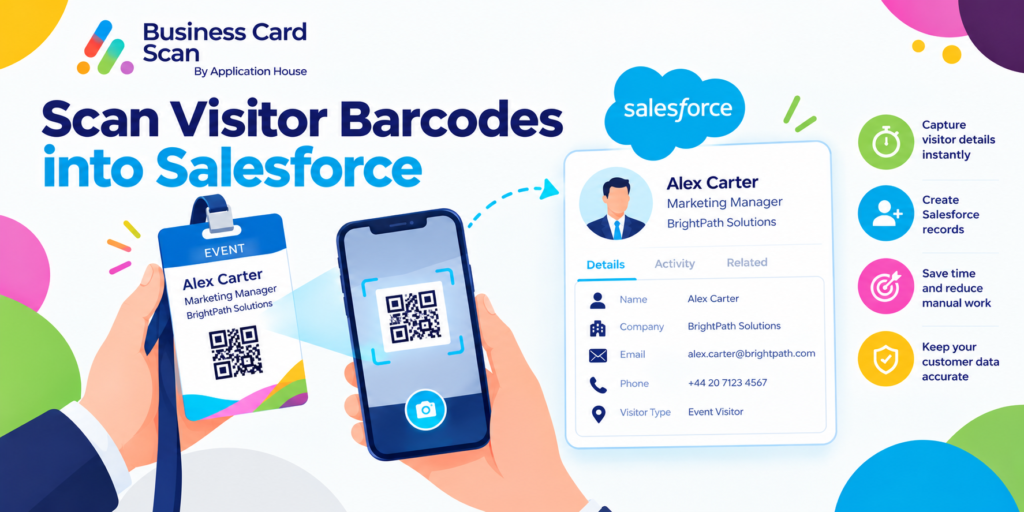
Scan Visitor Barcodes into Salesforce
You may receive your visitor information through a barcode on your registration material, visitor passApplication House Business Card Scan App, event information or another business document instead of through a traditional business card.
You can use visitor pass to read supported barcodes through your Salesforce Mobile App and bring your captured information into your configured Salesforce process.
You can review your captured information before you create or update your Salesforce records.
You can turn your visitor barcode into useful business data while your conversation and business reason for meeting your visitor are still clear.
What Is Visitor Barcode Scanning
You can use visitor barcode scanning when your visitor presents a barcode containing information that your app can capture.
You may receive your barcode on your visitor pass, registration confirmation, invitation or other material used during your business interaction.
You can scan your supported barcode rather than asking your user to manually copy the available information into Salesforce.
You can then use your captured information with the Salesforce objects and fields your administrator has configured.
Scan Visitor Barcodes with the Salesforce Mobile App
You can scan your supported barcode through your Salesforce Mobile App while you are with your visitor.
You can capture your available information and continue into your Salesforce review and save process.
You can keep your visitor capture inside the Salesforce environment your team already uses.
You can reduce your need to collect information first and enter your visitor into Salesforce later.
Scan Your Visitor at the Point of Conversation
You may meet your visitor at your conference, customer day, partner event or business premises while your visitor already has a barcode available.
You can scan your barcode while you still understand why your visitor matters to your business.
You can connect your captured information with your next Salesforce action instead of relying on your salesperson to remember your visitor after your meeting.
Turn Visitor Registration into Useful Salesforce Data
You may already have your visitor registered for an event or business activity before your salesperson speaks with your person.
You can use your visitor barcode as a practical bridge between your registration activity and your Salesforce relationship when your supported barcode contains information your app can capture.
You can review your information and decide how your visitor should become part of your Salesforce process.
You can give your sales or account team useful information about the person behind your business interaction rather than treating your barcode as only an entry mechanism.
Customer and Partner Events
You may organise your customer day, partner meeting or product launch where your invited visitors arrive with registration information.
You can scan your supported visitor barcode when your salesperson begins a meaningful business conversation.
You can bring your visitor into your Salesforce process while your team still knows the reason for your interaction.
You can make your event attendance commercially useful beyond simply confirming that your person arrived.
Explore our Business Card Scanner App on Salesforce AppExchange to discover its features and capabilities.
Create Salesforce Records from Visitor Barcode Scan
You may need different Salesforce outcomes depending on who your visitor is and why your person is meeting your organisation.
You can configure your scan to create your Lead, Contact, Contact and Account, Campaign Member or another standard or custom Salesforce record.
You can map your captured information into your chosen Salesforce fields and relate your records around your business process.
You can therefore make your visitor barcode support your Salesforce data model rather than forcing every visitor into one fixed record.
Create Lead from Visitor Barcode Scan
You may scan your visitor barcode from a person who represents a completely new sales opportunity for your organisation.
You can create your Lead when your configured Salesforce process treats your visitor as a new prospect.
You can place your person into your qualification process while your business conversation is still relevant.
You can give your sales team a Salesforce record to follow up instead of leaving your new prospect as an anonymous event visitor.
Create Contact from Visitor Barcode Scan
You may scan your visitor barcode from another person within a company your organisation already works with.
You can create your Contact when your configured process needs your visitor represented within your existing customer relationship.
You can make your new stakeholder visible to your wider account team.
You can build your understanding of your customer organisation as more people become involved in your relationship.
Create Contact and Account from Visitor Barcode Scan
You may meet your visitor from a company that does not yet exist in your Salesforce organisation.
You can create your Contact and Account when your configured process needs both your person and company represented.
You can relate your Contact to your Account so your visitor enters Salesforce with useful organisation context.
You can turn your first face to face interaction into a structured business relationship rather than an isolated visitor record.
Create Campaign Member from Visitor Barcode Scan
You may scan your visitor during your marketing event, seminar, conference or customer campaign.
You can use your configured Campaign Member process when your visitor should be associated with your Salesforce Campaign.
You can add your existing Contact to your Campaign when your person is found, or you can use your Lead process where appropriate.
You can keep your visitor connected with the activity that generated your conversation and subsequent sales follow up.
Create Any Salesforce Record from Visitor Barcode Scan
You may have your own visitor, membership, partner, supplier or industry process represented through Salesforce custom objects.
You can use your Visitor Barcode Scan with any standard or custom Salesforce object your administrator can access and create through your configured scan.
You can place your captured information into your chosen fields and relate your records according to your business requirements.
You can make your barcode scanning useful to your own Salesforce application rather than limiting your visitor to standard CRM records.
Check Whether Your Visitor Already Exists in Salesforce
You may scan your barcode from a visitor your organisation already knows.
You can use your configured Salesforce Duplicate Rules or app matching rules to check your captured information against your existing records.
You can review your possible match and update your existing relationship where appropriate.
You can avoid treating every visit as a completely new customer simply because your person presents another barcode.
Add Business Context After Your Barcode Scan
You may capture useful visitor information from your barcode while your salesperson understands additional context from your conversation.
You can review your captured information before your final Salesforce save.
You can use your configured fields and fixed values to add the business context your Salesforce process requires.
You can therefore combine your captured barcode information with the Salesforce structure your organisation uses for ownership, qualification or follow up.
Use Visitor Barcode Scan for High Volume Business Events
You may have many visitors moving through your exhibition, conference, customer day or partner event.
You can scan your supported visitor barcode at the point where your person becomes commercially relevant to your team.
You can reduce your manual entry while your sales representatives spend more of your event time speaking with visitors.
You can give your team structured Salesforce information for your follow up after your event.
Capture the Visitors Your Sales Team Actually Speaks With
You may not need every person who enters your venue to become a Salesforce sales record.
You can scan your visitor when your person has a meaningful conversation with your salesperson or expresses interest in your business.
You can keep your Salesforce data focused on the relationships your team actually wants to develop.
You can give your event team control over when your visitor moves from attendance into your business process.
Barcode Scan and Event Badge Scan Are Different
You may see both a barcode and printed information on your visitor’s event badge.
You can use your Barcode Scan when your supported barcode itself contains information your app can capture.
You can use your Badge Scan when your printed event badge contains useful person information but your badge code holds only an attendee number.
You can let your Badge Scan read your printed visitor details while ignoring event branding and role words such as Speaker when your barcode does not contain the contact information you need.
You can therefore choose your scanning method according to where your useful visitor information actually exists.
QR Code Scan, Barcode Scan and Badge Scan
You may encounter different codes and printed information as your visitors move between different events and organisations.
You can use your QR Code Scan when your person shares supported contact information or a digital business card link through a QR code.
You can use your Barcode Scan when your visitor presents a supported barcode containing information your app can capture.
You can use your Badge Scan when your useful visitor details are printed on your event badge rather than contained within your code.
You can keep your Salesforce destination consistent while your method of capturing your visitor changes according to your business situation.
Keep Your Visitor Follow Up Connected with Salesforce
You may have your most valuable event conversations during a few busy minutes when your team is meeting many people.
You can capture your supported visitor barcode and create the Salesforce records your follow up process needs while your interaction still has context.
You can make your visitor available to your sales, marketing or account team instead of leaving your information inside a separate event system or individual notes.
You can turn your visitor scan into the beginning of your next business action rather than the end of your event interaction.
Scan Visitor Barcodes into Salesforce with Application House
You can use Application House Business Card Scan App when your visitor presents a supported barcode containing information your Salesforce process can use.
You can scan your barcode through your Salesforce Mobile App, review your captured information and decide how your visitor should be saved.
You can create your Lead, Contact, Contact and Account, Campaign Member or another configured Salesforce record according to your business process.
You can use your configured Salesforce fields, relationships and duplicate controls around your captured visitor information.
You can turn your visitor barcode into useful Salesforce data that your business can qualify, follow up and develop after your conversation.
Frequently Asked Questions
1. How can you scan visitor barcodes into Salesforce?
You can use the Application House business card scan app to scan supported visitor barcodes through your Salesforce Mobile App. The app captures available barcode information, allowing you to review the details and create or update Salesforce records through your configured scanning process.
2. Can you create Salesforce Leads from visitor barcode scans?
Yes. You can configure Visitor Barcode Scan to create Salesforce Leads from captured visitor information. You can map the available details to your selected Lead fields and review the information before saving it to Salesforce.
3. Can you add event visitors to Salesforce Campaigns using barcode scanning?
Yes. You can configure your scanning process to add visitors as Salesforce Campaign Members. You can associate existing Leads or Contacts with your selected Campaign, helping you track prospects collected at exhibitions, conferences and marketing events.
4. What is the difference between Salesforce Barcode Scan and Badge Scan?
Barcode Scan captures information stored within a supported barcode. Badge Scan reads printed visitor information from an event badge. For example, if a barcode contains only an attendee number but the badge displays the visitor’s name and company, Badge Scan is the appropriate option.
5. How can you avoid duplicate Salesforce records when scanning visitor barcodes?
You can use Salesforce Duplicate Rules or Application House app matching rules to identify existing records. You can review potential matches and select the appropriate existing Salesforce record instead of creating unnecessary duplicates.
6. Can you scan visitor barcodes and create custom Salesforce objects?
Yes. You can configure your scanning process to create records in supported standard or custom Salesforce objects. You can map captured information to selected fields and establish relationships between records according to your business requirements.
7. Can one visitor barcode scan create multiple Salesforce records?
Yes. You can configure one scan to prepare multiple Salesforce records, such as Leads, Contacts, Accounts, Campaign Members or custom objects. This helps you capture visitor information once and use it across your required Salesforce records.